![MicrosoftTeams-image (28).png]](https://helpdesk.turnup.world/hs-fs/hubfs/MicrosoftTeams-image%20(28).png?width=85&height=85&name=MicrosoftTeams-image%20(28).png)
This feature only works if TurnUp is actively synced with your PMS.
⚙️ How to set it up?
-
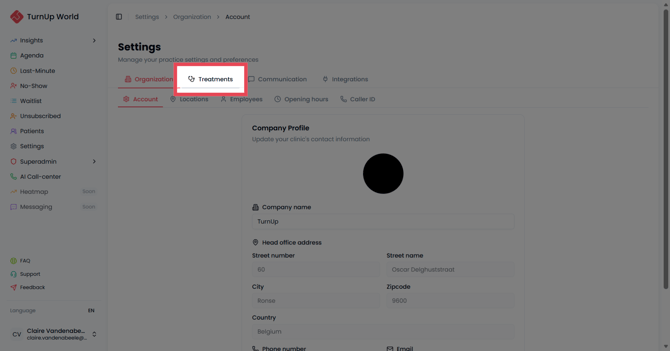
Log in to TurnUp World and go to Settings > Treatments
-
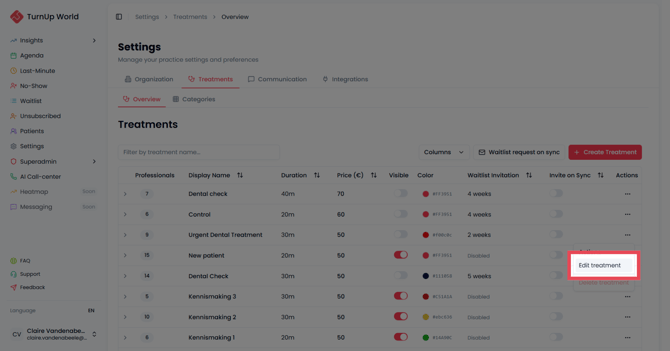
Select the treatments for which you want to activate the feature. Think of treatments with a longer waiting time — such as fillings, crowns, or new patient consultations.
-
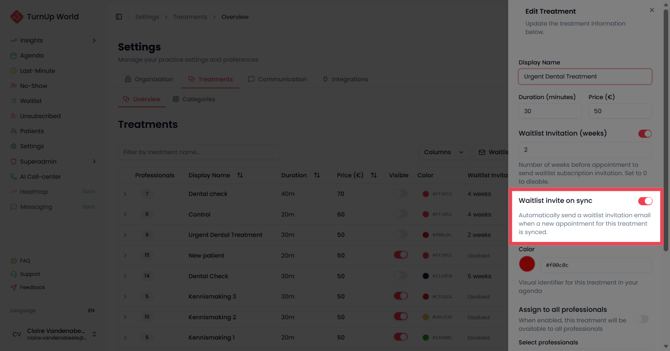
Click Edit and turn on the Waitlist Invitation on sync toggle for each relevant treatment.
-
Save. From now on, TurnUp detects new appointments via the sync and automatically sends the patient an invitation to join the waitlist.
-
Make sure to let patients know when booking that they'll receive an email from TurnUp. That way they'll understand what the invitation is for — and sign up faster.
💡 Tip: This feature runs in the background as a safety net. Keep proactively adding patients to the waitlist yourself. This feature is a useful addition, not a replacement for your own follow-up.
📧 What does the patient see?
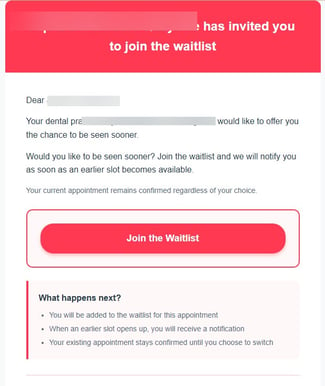
Once the feature is active, the patient automatically receives an email from TurnUp. If they sign up, they can immediately indicate their unavailable days — so you only send last-minute invitations to patients who can actually come in.
The patient is then added to the waitlist, linked to the correct treatment and the right practitioner.
✅ What's in it for you?
-
Less manual follow-up
-
Your waitlist fills up automatically — no extra work at the front desk
-
Only patients who are genuinely interested in an earlier appointment are on your list. Patients sign up themselves — so they're motivated and available. Your last-minute success rate goes up.
-
More last-minute slots filled: a larger, high-quality waitlist means more options when a slot opens up — and fewer gaps in your schedule.
Any questions? Check the helpdesk or contact the TurnUp support team. We're happy to help.