
How you sign up again depends on your situation: did you already have an appointment with the practice, or did you sign up as a new patient? Below you'll find the right steps for your case.
✅ How to sign up again
1️⃣ Did you have an existing appointment with the practice?
Then you were on the waitlist linked to that specific appointment. You have two options:
- Via the TurnUp app: Open the app and go to the Calendar tab. Click on the appointment in question, then click "Join waitlist". You'll receive a confirmation email right away, and you'll be back on the waitlist for that appointment.
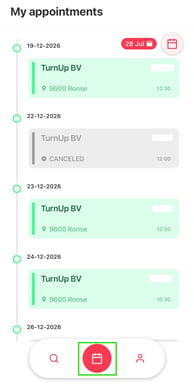
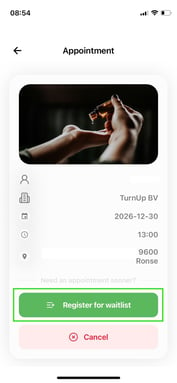
- Via the practice itself: Contact the dental practice by phone or email and ask them to add you back to the waitlist.
2️⃣ Didn't have an appointment yet — for example, did you sign up as a new patient through the practice's website form?
Then you can't sign up again yourself through the app. In that case, simply fill in the practice's website form again. This recreates your waitlist entry.
💡 Why stay on the waitlist?
- You get a chance at an earlier appointment. If a slot opens up that suits you — for example due to a cancellation — you'll be notified.
- Your appointment stays as is. The waitlist doesn't replace your current appointment — it's simply an extra chance to be seen sooner.
- You decide. If you're offered a slot that doesn't suit you, you simply don't have to accept it.
- No extra effort. You're automatically notified when something becomes available — no need to keep calling or checking the practice's website yourself.
ℹ️ Good to know
- Your confirmation email is your guarantee that the sign-up worked — be sure to check it.
- Linked to an existing appointment? Then you can always handle this yourself, quickly, via the app — no need to call.
- Not sure if it worked, or can't find the button? Feel free to contact the practice — they can also check or adjust your sign-up for you.