
Don't want to use the TurnUp mobile app anymore? You can easily delete your account yourself, right from your profile. Good to know: once deleted, your account can't be restored.
Why do we ask you to do this yourself?
A request by email to our support team doesn't give us certainty that it really comes from you. That's why it's best to do this through the app itself, where you're already logged in as a user and your identity is already confirmed.
⚙️ How to delete your account
1️⃣ Go to your profile in the top right of the TurnUp app.
2️⃣ Tap the trash icon.
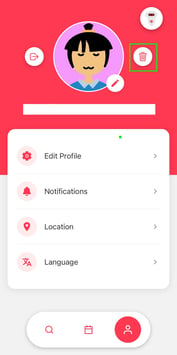
3️⃣ Confirm that you want to delete your account.
Your account will then be permanently deleted.
⚠️ After deleting your account
- You can no longer use the TurnUp app.
- You'll no longer receive notifications via the TurnUp app.
- You'll lose access to your personal data and history within TurnUp.
✅ Good to know
- This can't be undone. Make sure you're certain before confirming.
- Your access stops immediately. You won't be able to log in once the deletion is confirmed.
- Not sure? Contact support before deleting your account — we're happy to help if something else is going on.